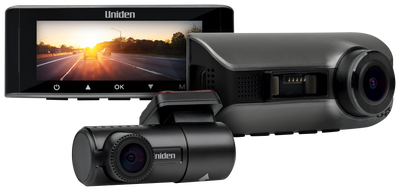
Uniden iGO CAM 51R 4K Front & Full HD Rear Dash Camera
Regular price$249
Product Description
4K front. Full HD rear. A clearer record of your drive. From the daily commute to a weekend away, the iGO CAM 51R gives you a record from both ends of your vehicle. Its front and rear cameras record together, combining 4K front video with Full HD 1080p rear video. When you need to look back at a moment, use the Uniden Dashview Pro app to find the recording, review the details and manage your camera settings.
Uniden iGO CAM 51R 4K Front & Full HD Rear Dash Camera
$249.00
Key Features
4K Front Camera Recording
Includes FULL HD 1080P Rear Camera
Simultaneous Front and Rear Recording
Wi-Fi Enabled with Uniden Dashview Pro App Control
Parking Mode*
AI Playback Review with Number-Plate Enlargement and Approximate Object-Distance Information
1 Frame-Per-Second Time-Lapse Parking Recording*
Locked Event Recordings
Loop Recording with Selectable 1-, 3- or 5-Minute Clips
Photo Capture from the Camera or App
What's in the box
1 × iGO CAM 51R Front Dash Camera with attached windscreen mount bracket
1 × Rear Camera with 5.5m extension cable, screws and adhesive sticker
1 × Extra Adhesive Sticker for the windscreen mount bracket
1 × Vehicle Charger with Type-C USB power lead
1 × Windscreen Protection Film
Overview
Keep both sides of the drive in view.
A moment on the road can involve more than what is happening ahead. The iGO CAM 51R records the front and rear views together, giving you two perspectives to review after your journey.
Choose 4K front with Full HD 1080p rear recording, or select 2K front with Full HD rear. The default setting is 4K + 1080p, so the front camera is set to its highest listed recording resolution from the start.
Find the moment. Review the footage.
Connect your phone directly to the camera’s Wi-Fi hotspot and open the Uniden Dashview Pro app. View the camera feed, adjust recording settings, control audio recording and take snapshots from your phone.
Recordings are organised into Loop, Locked File and Snapshot tabs. Browse by list, timeline or calendar to find the clip you want to review. Choose recording clips of one, three or five minutes to suit the way you prefer to browse your footage.
Review the details with AI mode.
Use the app’s AI mode when reviewing recorded clips to display enlarged number plates and approximate object-distance information. It gives you another way to examine details in the footage you have captured.
AI mode is a playback feature in the Uniden Dashview Pro app. Displayed distances are estimates.
Set up your camera for time away from the wheel.
With a compatible optional hardwire kit installed and the relevant settings enabled in the app, the iGO CAM 51R enters Parking Mode when the vehicle ignition is switched off.
Time-lapse recording captures at one frame per second for the selected period. You can also enable parking collision detection: a detected impact or vibration wakes the camera to record a 20-second event clip, stores it as a locked file, then returns the camera to sleep.
Parking Mode requires a compatible optional hardwire kit, sold separately, and the relevant parking settings must be enabled in the app. A compatible microSD card and a suitable power supply are required.
Adjustable impact sensitivity. Organised recordings.
Set the G-sensor collision sensitivity to Low, Medium or High through the app. Recordings locked after a G-sensor trigger appear in the Locked File tab, helping you find event clips when you want to review them.
You can also capture a still image using the camera’s photo button or the app’s snapshot control. Audio recording can be switched on or off to suit your preference.
Two cameras. One included vehicle charger.
The pack includes the front camera with its windscreen mount, a rear camera with a 5.5-metre extension cable, mounting materials and a vehicle charger with a Type-C USB power lead.
Disclaimer
## Disclaimer
\***Parking Mode:** Requires a compatible optional hardwire kit, sold separately, a suitable external power supply and the relevant parking settings enabled in the Uniden Dashview Pro app. A compatible microSD card is required. When parking collision detection is enabled, a detected impact or vibration wakes the camera to record a 20-second event video.
†**Memory Card:** Supports compatible microSD cards up to 256GB, Class 10 or higher. A minimum capacity of 16GB is recommended. Format the card before first use and regularly as directed in the owner’s manual. Back up important footage before formatting, as formatting deletes stored files.
‡**AI Playback Review:** Available when reviewing recorded clips in the Uniden Dashview Pro app. Number-plate enlargement depends on the detail captured in the original recording. Object-distance information is approximate.
**Recording Resolution:** 4K recording applies to the front camera. The included rear camera records in Full HD 1080P. Selectable recording configurations are 4K front + 1080P rear or 2K front + 1080P rear.
**Wi-Fi Connectivity:** App functions require a compatible phone connected directly to the dash camera’s Wi-Fi hotspot through the Uniden Dashview Pro app.
**Installation:** Install and operate the cameras in accordance with the owner’s manual. Camera lenses must have a clear, unobstructed view through clean glass. Position the cameras and cables so they do not interfere with the driver’s view, vehicle controls, airbags or other safety systems.
Operation Manuals & Downloads
Operation Manual
Download the complete operation manual for this product
Does the iGO CAM 51R record the front and rear at the same time?
Yes. The iGO CAM 51R records both views simultaneously, with 4K video from the front camera and Full HD 1080P video from the included rear camera. You can also select 2K front recording with Full HD rear recording through the app.
Is the rear camera included?
Yes. The rear camera is included, along with a 5.5m extension cable, mounting screws and an adhesive sticker.
How do I view recordings on my phone?
Connect your phone directly to the dash camera’s Wi-Fi hotspot, then open the Uniden Dashview Pro app. You can view the camera feed, review recorded footage and snapshots, and adjust camera settings. Recorded files are organised into Loop, Locked File and Snapshot tabs, with list, timeline and calendar views to help you find the moment you need.
What does AI Playback Review do?
When reviewing recorded clips in the Uniden Dashview Pro app, AI mode can display enlarged number plates and approximate object-distance information to help you examine details in your footage. Displayed distances are estimates.
Can the iGO CAM 51R record while my vehicle is parked?
Yes. Parking Mode is available when the camera is connected to a compatible optional hardwire kit and the relevant parking settings are enabled in the app. You can enable time-lapse recording, impact-triggered recording, or both. Parking Mode also requires a compatible microSD card and a suitable power supply.
What happens if an impact is detected while parked?
With parking collision detection enabled, a detected impact or vibration wakes the camera from sleep. It records a 20-second event video, stores the recording as a locked file, then returns to sleep. This feature requires a compatible optional hardwire kit and the relevant app settings to be enabled.