

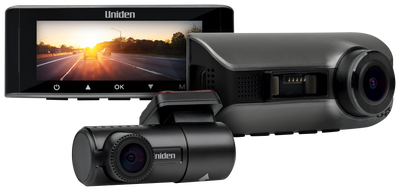
Dash cams
Parking recording starts with the right power arrangement.
Understand what powers parked recording and what different parking modes capture, without assuming the camera has an overnight battery.
TL;DR
- Parking mode needs sufficient external power through the correct hardwire arrangement.
- The supercapacitor saves a recording during shutdown; it is not an overnight recording battery.
- The 60+/60R manual documents collision-triggered and time-lapse parking options.
- The 40R manual documents separate parking, motion and 1FPS behaviour. Check the chosen mode and test the installation.
A dash cam can include parking functions without being able to run from an unpowered vehicle socket. Parked recording needs the correct power supply, installation and settings for the exact model.
This guide explains the parking information documented for the Dash View 60+, 60R and 40R, including why a supercapacitor does not replace external parking power.
Why the power connection matters
A socket that switches off with the ignition stops supplying the camera. If you want parked recording, check the hardwire installation specified for your model rather than assuming an ordinary plug-in connection will keep it running.
The reviewed 60+/60R manual refers to the HWK-3 arrangement. The reviewed 40R manual refers to HWK-1A. Check the current product package and manual because compatible equipment and supplied accessories can change.
Use the model-specific instructions and a suitable professional installer for the vehicle's electrical work. Ask the installer to demonstrate both normal recording and the selected parking behaviour before the job is considered finished.
What does the supercapacitor do?
A supercapacitor provides enough backup power for a recording in progress to be saved when external power is removed. It should not be described as a battery that keeps the camera recording throughout the night.
The parking function still depends on the specified external supply. If a camera turns off after the ignition is switched off, that does not by itself establish a fault in the supercapacitor.
First check how power is supplied, which parking mode is selected and what behaviour that mode is designed to provide.
Parking options documented for the 60+ and 60R
The shared 60+/60R manual describes collision detection that wakes the camera and records for 60 seconds after an impact is detected. It also describes a time-lapse parking option that records at one frame per second after the ignition-switched current is cut.
Those are different records. An impact event is triggered by detected activity; a time-lapse sequence supplies a background view at its recording interval.
Both require sufficient external power. Check the available options on the current device and select the mode that fits what you want to review while parked.
Parking options documented for the 40R
The 40R manual separately describes parking events triggered by sudden movement or collision, motion detection recording and a 1FPS option.
Its parking-event description starts with a 60-second recording and describes extension when movement or collision is still detected near the end. Its 1FPS description is motion-triggered and describes a ten-minute recording period, with extension conditions.
Do not describe that 1FPS option as identical to the 60+/60R time-lapse mode. Read the exact mode description and check the settings on your camera.
Ask what protects the vehicle's battery
The vehicle's parked-power arrangement also needs to suit how long the car is left and how it is used. Ask the installer which battery-protection functions the chosen kit provides and how they are configured.
A camera cannot promise unlimited parking operation independently of the available vehicle power. A protection cut-off or an unsuitable power setup can stop recording even though the camera's parking mode is enabled.
If the system stops sooner than expected, check the power arrangement with the installer rather than trying to bypass its protections.
A parking-mode handover checklist
- Confirm the hardwire equipment matches the camera and vehicle.
- Check normal recording with the engine running.
- Confirm the selected parking mode and its expected behaviour.
- Review a safe demonstration or test arranged with the installer.
- Find the resulting parking recording and save a copy.
- Confirm the vehicle-power protection settings and what happens when power is cut.
Return to the footage download guide if you need help retrieving the result. Testing a saved file is more useful than checking only a setting labelled “parking”.
Choose coverage for the parked car as well as the road
A front camera cannot record activity outside its view. Consider where the car is commonly parked and which directions matter. Rear or cabin coverage supplies different information, but all views need a suitable installation and supported recording combination.
Use the 60+, 60R and 40R comparison to choose the coverage, then the dash cam buying guide to check storage, recording modes and retrieval.
Frequently asked questions
Does parking mode work from a socket that turns off with the engine?
It needs sufficient external power. A switched-off socket should not be assumed to supply the camera's parking functions; check the required hardwire setup.
Will the supercapacitor record all night?
No. Its shutdown role is to help save the current recording. Parking recording still needs the specified external power supply.
Are collision recording and time-lapse parking the same?
No. Collision recording responds to detected impact, while time-lapse modes use a background interval according to the model's instructions.
Why is parking mode not shown or not working?
Check the correct hardwire connection, external power and model settings. The reviewed manuals describe parking options appearing with the required hardwire supply.
Plan parking coverage before installation.
Compare the models, then have the correct power setup demonstrated.
Parking mode and installation: further reading
These 60R reviews discuss parking functions and installation. Follow the manual for your camera's power arrangement. Power requirements vary by model; a review of one camera is not wiring instructions for another.
Media coverage


Share:
5k vs 4k Dash Cam Resolution
Continuous Recording vs Motion Detection Onwatch